> ## Documentation Index
> Fetch the complete documentation index at: https://neo.tvk.company/llms.txt
> Use this file to discover all available pages before exploring further.
# Date Field
> A sophisticated segmented DD-MM-YYYY input with smart keyboard navigation, auto-advance, and comprehensive validation support.
## Examples
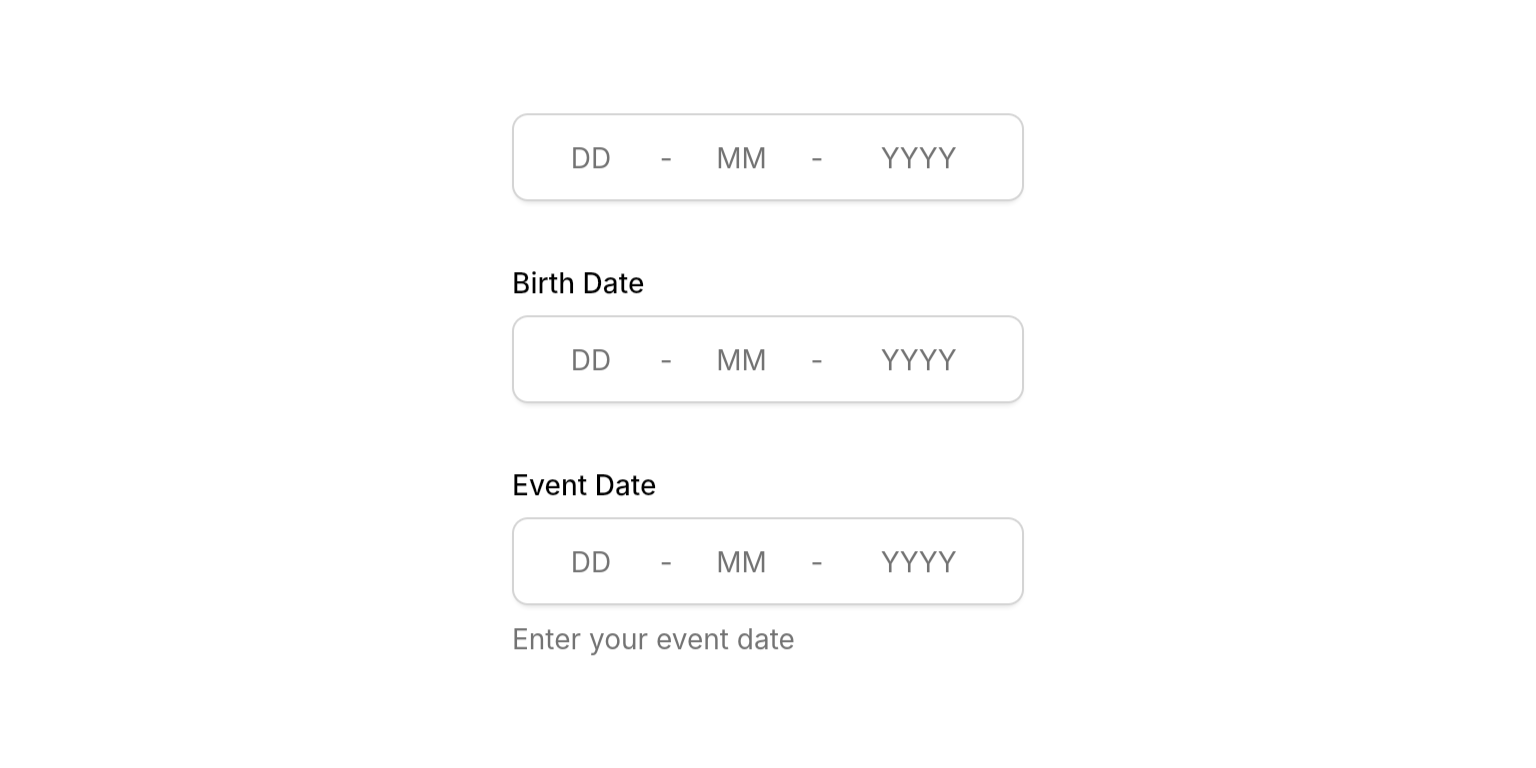
 ```dart Simple Date Field lines theme={null}
NeoDateField(
dateString: dateString.value, // Using hooks
onSubmitted: (value) {
dateString.value = value;
},
),
```
```dart With Label lines theme={null}
NeoDateField(
dateString: dateString.value, // Using hooks
label: "Birth Date",
onSubmitted: (value) {
dateString.value = value;
},
),
```
```dart With Description lines theme={null}
NeoDateField(
dateString: dateString.value, // Using hooks
label: "Event Date",
description: "Enter your event date",
onSubmitted: (value) {
dateString.value = value;
},
),
```
```dart Simple Date Field lines theme={null}
NeoDateField(
dateString: dateString.value, // Using hooks
onSubmitted: (value) {
dateString.value = value;
},
),
```
```dart With Label lines theme={null}
NeoDateField(
dateString: dateString.value, // Using hooks
label: "Birth Date",
onSubmitted: (value) {
dateString.value = value;
},
),
```
```dart With Description lines theme={null}
NeoDateField(
dateString: dateString.value, // Using hooks
label: "Event Date",
description: "Enter your event date",
onSubmitted: (value) {
dateString.value = value;
},
),
```

 ```dart With NeoDateValidator lines theme={null}
final dateString = useState("");
final errorMessage = useState(null);
NeoDateField(
dateString: dateString.value,
label: "Birth Date",
errorText: errorMessage.value,
onSubmitted: (value) {
dateString.value = value;
try {
// Validate the date string
final date = NeoDateValidator.validate(value);
// Check if the date is not in the future
NeoDateValidator.validateIsNotFuture(date);
// Date is valid
errorMessage.value = null;
print("Valid birth date: ${NeoDateValidator.format(date)}");
} on FormatException catch (e) {
errorMessage.value = e.message;
} on ArgumentError catch (e) {
errorMessage.value = e.message;
}
},
),
```
```dart Custom Validation Logic lines theme={null}
final dateString = useState("");
final errorMessage = useState(null);
String? validateAge(String dateString) {
try {
final date = NeoDateValidator.validate(dateString);
NeoDateValidator.validateIsNotFuture(date);
// Custom rule: Must be at least 18 years old
final eighteenYearsAgo = DateTime.now().subtract(Duration(days: 365 * 18));
if (date.isAfter(eighteenYearsAgo)) {
return "Must be at least 18 years old";
}
return null; // Valid
} on FormatException catch (e) {
return e.message;
} on ArgumentError catch (_) {
return "Birth date cannot be in the future";
}
}
NeoDateField(
dateString: dateString.value,
label: "Birth Date",
errorText: errorMessage.value,
onSubmitted: (value) {
dateString.value = value;
errorMessage.value = validateAge(value);
},
),
```
```dart With NeoDateValidator lines theme={null}
final dateString = useState("");
final errorMessage = useState(null);
NeoDateField(
dateString: dateString.value,
label: "Birth Date",
errorText: errorMessage.value,
onSubmitted: (value) {
dateString.value = value;
try {
// Validate the date string
final date = NeoDateValidator.validate(value);
// Check if the date is not in the future
NeoDateValidator.validateIsNotFuture(date);
// Date is valid
errorMessage.value = null;
print("Valid birth date: ${NeoDateValidator.format(date)}");
} on FormatException catch (e) {
errorMessage.value = e.message;
} on ArgumentError catch (e) {
errorMessage.value = e.message;
}
},
),
```
```dart Custom Validation Logic lines theme={null}
final dateString = useState("");
final errorMessage = useState(null);
String? validateAge(String dateString) {
try {
final date = NeoDateValidator.validate(dateString);
NeoDateValidator.validateIsNotFuture(date);
// Custom rule: Must be at least 18 years old
final eighteenYearsAgo = DateTime.now().subtract(Duration(days: 365 * 18));
if (date.isAfter(eighteenYearsAgo)) {
return "Must be at least 18 years old";
}
return null; // Valid
} on FormatException catch (e) {
return e.message;
} on ArgumentError catch (_) {
return "Birth date cannot be in the future";
}
}
NeoDateField(
dateString: dateString.value,
label: "Birth Date",
errorText: errorMessage.value,
onSubmitted: (value) {
dateString.value = value;
errorMessage.value = validateAge(value);
},
),
```

 ```dart Error State lines theme={null}
NeoDateField(
dateString: dateString.value, // Using hooks
label: "Date",
errorText: "This field is required",
onSubmitted: (value) {
dateString.value = value;
},
),
```
```dart Disabled State lines theme={null}
NeoDateField(
dateString: dateString.value, // Using hooks
label: "Date",
description: "Select your preferred date",
isEnabled: false,
onSubmitted: (value) {
// Won't be called when disabled
},
),
```
## Properties
### Required
The current date string value in DD-MM-YYYY format. Can be partial during input but should be complete for display. Use `null` or empty string to clear the field.
Callback triggered when user completes editing (all segments filled or Enter pressed). Receives the normalized date string in DD-MM-YYYY format, or `null` when the field is cleared or contains invalid input.
### Content
Optional label text displayed above the date field.
Optional helper text displayed below the field. Hidden when `errorText` is present.
### State
Error message displayed below the field. When present, shows error state with danger-colored border and replaces the description text.
Controls whether the field accepts input and focus. When disabled, the field appears dimmed and prevents all interaction.
Focus node for managing focus state programmatically. When not provided, the widget creates its own internal focus node.
Callback function called when the field loses focus. Useful for explicit blur event handling.
Whether to show a clear button (x) that allows users to quickly clear the date field content.
## Input Behavior
### Value Clamping
* **Typing**: Days clamped to 1-31, months to 1-12, years to 1-9999 regardless of context
* **Arrow keys**: Context-aware clamping (e.g., day respects actual month/year if entered)
* **Why different?**: Safety in high-stake applications - typing "31-02" shows the invalid state instead of silently auto-correcting
### Auto-Advance
* **Day**: Advances when typing ≥ 4 (e.g., "4" becomes "04" and advances)
* **Month**: Advances when typing ≥ 2 (e.g., "2" becomes "02" and advances)
* **Year**: Submits when 4 digits entered
### Navigation
* **Arrow keys**: Move between segments or increment/decrement values
* **Tab**: Standard focus navigation
* **Click**: Jump to any segment and select all content
## Best Practices
* **Validation**: Use [`NeoDateValidator`](/utilities/validators/date-validator) in `onSubmitted` for comprehensive validation
* **Width constraints**: Wrap in `SizedBox`, `Expanded`, or `ConstrainedBox` to prevent layout issues
* **Error handling**: Clear `errorText` and update `dateString` in `onSubmitted` for smooth UX
## Integration Notes
* **Submission-based**: Calls `onSubmitted` when complete (all segments filled, Enter pressed, or focus lost)
```dart Error State lines theme={null}
NeoDateField(
dateString: dateString.value, // Using hooks
label: "Date",
errorText: "This field is required",
onSubmitted: (value) {
dateString.value = value;
},
),
```
```dart Disabled State lines theme={null}
NeoDateField(
dateString: dateString.value, // Using hooks
label: "Date",
description: "Select your preferred date",
isEnabled: false,
onSubmitted: (value) {
// Won't be called when disabled
},
),
```
## Properties
### Required
The current date string value in DD-MM-YYYY format. Can be partial during input but should be complete for display. Use `null` or empty string to clear the field.
Callback triggered when user completes editing (all segments filled or Enter pressed). Receives the normalized date string in DD-MM-YYYY format, or `null` when the field is cleared or contains invalid input.
### Content
Optional label text displayed above the date field.
Optional helper text displayed below the field. Hidden when `errorText` is present.
### State
Error message displayed below the field. When present, shows error state with danger-colored border and replaces the description text.
Controls whether the field accepts input and focus. When disabled, the field appears dimmed and prevents all interaction.
Focus node for managing focus state programmatically. When not provided, the widget creates its own internal focus node.
Callback function called when the field loses focus. Useful for explicit blur event handling.
Whether to show a clear button (x) that allows users to quickly clear the date field content.
## Input Behavior
### Value Clamping
* **Typing**: Days clamped to 1-31, months to 1-12, years to 1-9999 regardless of context
* **Arrow keys**: Context-aware clamping (e.g., day respects actual month/year if entered)
* **Why different?**: Safety in high-stake applications - typing "31-02" shows the invalid state instead of silently auto-correcting
### Auto-Advance
* **Day**: Advances when typing ≥ 4 (e.g., "4" becomes "04" and advances)
* **Month**: Advances when typing ≥ 2 (e.g., "2" becomes "02" and advances)
* **Year**: Submits when 4 digits entered
### Navigation
* **Arrow keys**: Move between segments or increment/decrement values
* **Tab**: Standard focus navigation
* **Click**: Jump to any segment and select all content
## Best Practices
* **Validation**: Use [`NeoDateValidator`](/utilities/validators/date-validator) in `onSubmitted` for comprehensive validation
* **Width constraints**: Wrap in `SizedBox`, `Expanded`, or `ConstrainedBox` to prevent layout issues
* **Error handling**: Clear `errorText` and update `dateString` in `onSubmitted` for smooth UX
## Integration Notes
* **Submission-based**: Calls `onSubmitted` when complete (all segments filled, Enter pressed, or focus lost)