> ## Documentation Index
> Fetch the complete documentation index at: https://neo.tvk.company/llms.txt
> Use this file to discover all available pages before exploring further.
# Toast
> A temporary notification overlay that appears at the bottom of the screen to provide feedback about operations or important information.
**Different from other Neo widgets**: Toast is used as a method call (`NeoToast.show()`) rather than a widget you place in your build tree. Call it inside callbacks—after button presses, successful API calls, or when operations complete—to provide instant user feedback.
## Examples
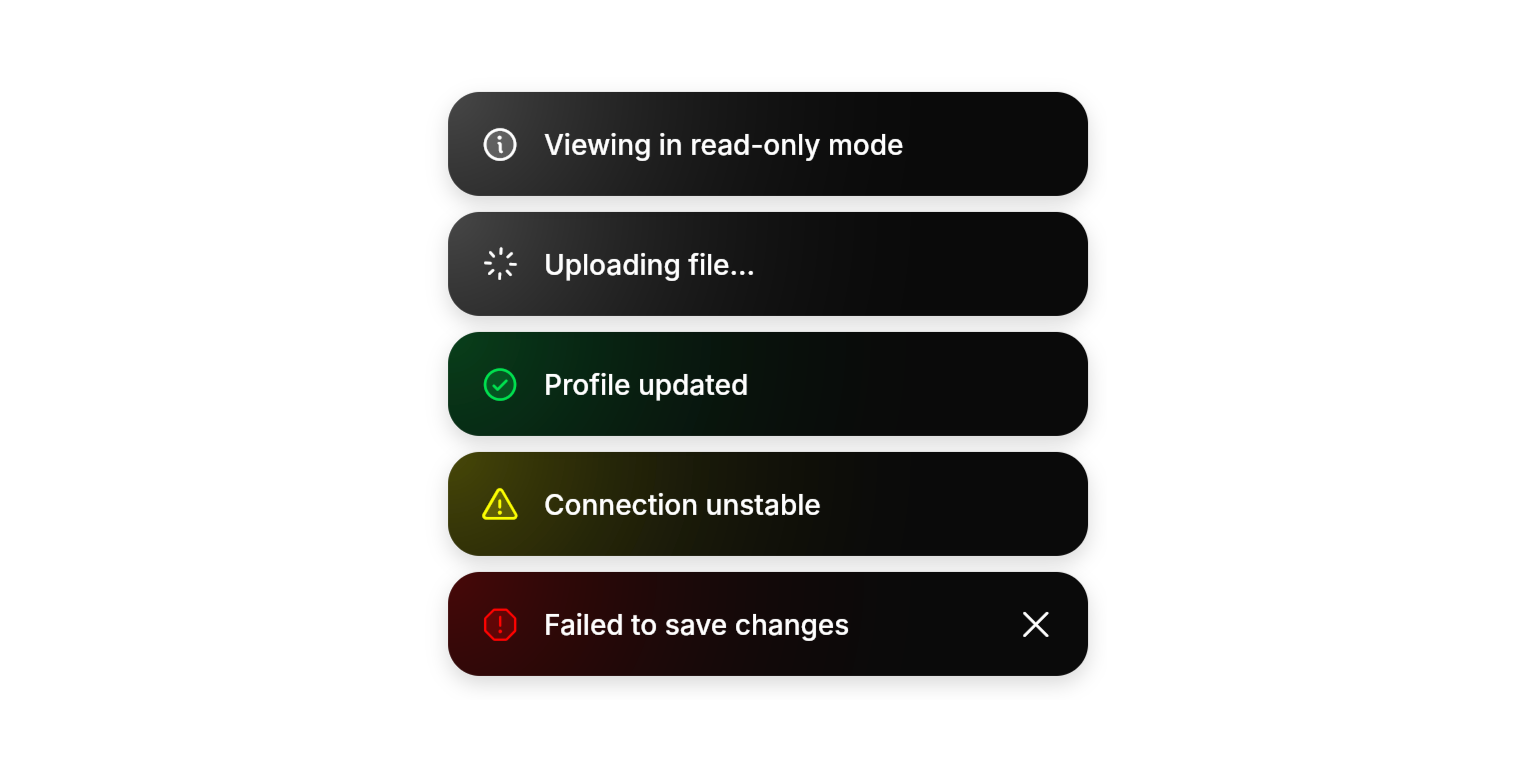
 ```dart Info Toast lines theme={null}
NeoToast.show(
ref: ref,
label: "Viewing in read-only mode",
type: .info,
);
```
```dart Loading Toast lines theme={null}
final toastId = NeoToast.show(
ref: ref,
label: "Uploading file...",
type: .loading,
);
```
```dart Success Toast lines theme={null}
NeoToast.show(
ref: ref,
label: "Profile updated",
type: .success,
);
```
```dart Warning Toast lines theme={null}
NeoToast.show(
ref: ref,
label: "Connection unstable",
type: .warning,
);
```
```dart Danger Toast lines theme={null}
NeoToast.show(
ref: ref,
label: "Failed to save changes",
type: .danger,
);
```
```dart Info Toast lines theme={null}
NeoToast.show(
ref: ref,
label: "Viewing in read-only mode",
type: .info,
);
```
```dart Loading Toast lines theme={null}
final toastId = NeoToast.show(
ref: ref,
label: "Uploading file...",
type: .loading,
);
```
```dart Success Toast lines theme={null}
NeoToast.show(
ref: ref,
label: "Profile updated",
type: .success,
);
```
```dart Warning Toast lines theme={null}
NeoToast.show(
ref: ref,
label: "Connection unstable",
type: .warning,
);
```
```dart Danger Toast lines theme={null}
NeoToast.show(
ref: ref,
label: "Failed to save changes",
type: .danger,
);
```

 ```dart Toast with Description lines theme={null}
NeoToast.show(
ref: ref,
label: "Export completed",
description: "Your data has been exported to Downloads/report.pdf",
type: .success,
);
```
```dart Toast with Description lines theme={null}
NeoToast.show(
ref: ref,
label: "Export completed",
description: "Your data has been exported to Downloads/report.pdf",
type: .success,
);
```

 ```dart Update Progress lines theme={null}
// Start with loading toast
final toastId = NeoToast.show(
ref: ref,
label: "Uploading file...",
type: .loading,
);
// Update to success when done
NeoToast.update(
ref: ref,
id: toastId,
label: "File uploaded successfully",
type: .success,
description: "Available in your documents folder",
);
```
## Methods
### NeoToast.show()
Displays a toast notification at the bottom right of the screen. Returns a string ID that can be used to update the toast later.
#### Required Parameters
The widget reference from a `ConsumerWidget` or `HookConsumerWidget`, used to access the toast provider.
The main text message to display in the toast.
The preset type that determines styling, icon, and behavior. Use presets for consistent UX.
#### Optional Parameters
Additional text displayed below the main label for extra context.
Custom icon to override the preset icon from `type`.
Custom color to override the preset color from `type`.
Custom auto-dismiss behavior to override the preset from `type`.
Whether the icon should rotate continuously (e.g. for custom loading states).
Whether to show a dismiss button. If null, determined by `autoDismiss` setting.
### NeoToast.update()
Updates an existing toast with new content. Perfect for progress feedback or changing toast context.
#### Required Parameters
The widget reference to access the toast provider.
The ID returned from `NeoToast.show()` to identify which toast to update.
#### Optional Parameters
New preset type to apply. Updates styling, icon, and behavior.
New main text message.
New description text.
New custom icon.
New custom color.
New auto-dismiss behavior.
New icon rotation state.
New dismiss button visibility.
## Enums
### NeoToastType
Predefined toast configurations that automatically handle styling and behavior.
* `info`: General information
* `loading`: Ongoing operations with spinner
* `success`: Successful actions with checkmark icon
* `warning`: Cautionary messages with warning icon
* `danger`: Error states with error icon
## Best Practices
* **Use Presets**: Leverage `NeoToastType` presets for consistent user experience and automatic behavior
* **Progress Updates**: Use `NeoToast.update()` for operations that transition between states (loading → success/error)
* **Appropriate Duration**: Trust preset auto-dismiss behavior—success/info toasts dismiss automatically, errors state require user action, loading state stays until type is changed or programatically dismissed
* **Description Usage**: Use `description` for helpful details like file paths, error codes, or next steps
* **Enhanced Feedback**: Combine with [`NeoHaptics`](/utilities/haptics) for error toasts to provide tactile feedback alongside visual notifications
## Integration Notes
* **Advanced Stacking**: Multiple toasts stack vertically with dynamic height calculation and smooth repositioning animations
* **Bounce Animation**: Toasts briefly scale up when updated, providing visual feedback for content changes, grabbing user's attention
* **Swipe-to-Dismiss**: When a toast has `autoDismiss` enabled or a dismiss control visible, users can drag it horizontally to dismiss. Dragging past \~25% of the toast width triggers dismissal with a light haptic. Releasing short of the threshold springs the toast back to its resting position.
```dart Update Progress lines theme={null}
// Start with loading toast
final toastId = NeoToast.show(
ref: ref,
label: "Uploading file...",
type: .loading,
);
// Update to success when done
NeoToast.update(
ref: ref,
id: toastId,
label: "File uploaded successfully",
type: .success,
description: "Available in your documents folder",
);
```
## Methods
### NeoToast.show()
Displays a toast notification at the bottom right of the screen. Returns a string ID that can be used to update the toast later.
#### Required Parameters
The widget reference from a `ConsumerWidget` or `HookConsumerWidget`, used to access the toast provider.
The main text message to display in the toast.
The preset type that determines styling, icon, and behavior. Use presets for consistent UX.
#### Optional Parameters
Additional text displayed below the main label for extra context.
Custom icon to override the preset icon from `type`.
Custom color to override the preset color from `type`.
Custom auto-dismiss behavior to override the preset from `type`.
Whether the icon should rotate continuously (e.g. for custom loading states).
Whether to show a dismiss button. If null, determined by `autoDismiss` setting.
### NeoToast.update()
Updates an existing toast with new content. Perfect for progress feedback or changing toast context.
#### Required Parameters
The widget reference to access the toast provider.
The ID returned from `NeoToast.show()` to identify which toast to update.
#### Optional Parameters
New preset type to apply. Updates styling, icon, and behavior.
New main text message.
New description text.
New custom icon.
New custom color.
New auto-dismiss behavior.
New icon rotation state.
New dismiss button visibility.
## Enums
### NeoToastType
Predefined toast configurations that automatically handle styling and behavior.
* `info`: General information
* `loading`: Ongoing operations with spinner
* `success`: Successful actions with checkmark icon
* `warning`: Cautionary messages with warning icon
* `danger`: Error states with error icon
## Best Practices
* **Use Presets**: Leverage `NeoToastType` presets for consistent user experience and automatic behavior
* **Progress Updates**: Use `NeoToast.update()` for operations that transition between states (loading → success/error)
* **Appropriate Duration**: Trust preset auto-dismiss behavior—success/info toasts dismiss automatically, errors state require user action, loading state stays until type is changed or programatically dismissed
* **Description Usage**: Use `description` for helpful details like file paths, error codes, or next steps
* **Enhanced Feedback**: Combine with [`NeoHaptics`](/utilities/haptics) for error toasts to provide tactile feedback alongside visual notifications
## Integration Notes
* **Advanced Stacking**: Multiple toasts stack vertically with dynamic height calculation and smooth repositioning animations
* **Bounce Animation**: Toasts briefly scale up when updated, providing visual feedback for content changes, grabbing user's attention
* **Swipe-to-Dismiss**: When a toast has `autoDismiss` enabled or a dismiss control visible, users can drag it horizontally to dismiss. Dragging past \~25% of the toast width triggers dismissal with a light haptic. Releasing short of the threshold springs the toast back to its resting position.