> ## Documentation Index
> Fetch the complete documentation index at: https://neo.tvk.company/llms.txt
> Use this file to discover all available pages before exploring further.
# Table
> A data table widget with sorting, row/column reordering, selection, column hiding, and efficient scrolling for large datasets.
## Examples
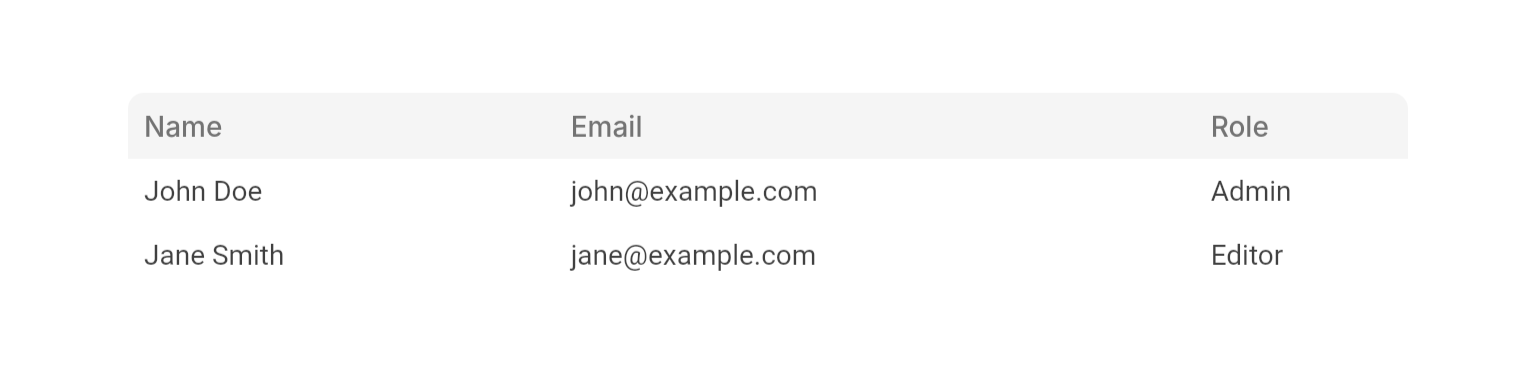
 ```dart Basic Table lines theme={null}
NeoTable(
columns: [
NeoTableColumn(id: "name", label: "Name", flex: 2),
NeoTableColumn(id: "email", label: "Email", flex: 3),
NeoTableColumn(id: "role", label: "Role", flex: 1),
],
rows: [
NeoTableRow(
id: "user1",
cells: {
"name": Text("John Doe"),
"email": Text("john@example.com"),
"role": Text("Admin"),
},
),
NeoTableRow(
id: "user2",
cells: {
"name": Text("Jane Smith"),
"email": Text("jane@example.com"),
"role": Text("Editor"),
},
),
],
),
```
```dart Basic Table lines theme={null}
NeoTable(
columns: [
NeoTableColumn(id: "name", label: "Name", flex: 2),
NeoTableColumn(id: "email", label: "Email", flex: 3),
NeoTableColumn(id: "role", label: "Role", flex: 1),
],
rows: [
NeoTableRow(
id: "user1",
cells: {
"name": Text("John Doe"),
"email": Text("john@example.com"),
"role": Text("Admin"),
},
),
NeoTableRow(
id: "user2",
cells: {
"name": Text("Jane Smith"),
"email": Text("jane@example.com"),
"role": Text("Editor"),
},
),
],
),
```

 ```dart Sortable Table lines theme={null}
final sortState = useState(
const NeoTableSortState(columnId: "name", direction: .ascending),
);
NeoTable(
sortState: sortState.value,
onSortChanged: (state) => sortState.value = state,
columns: [
NeoTableColumn(id: "name", label: "Name", flex: 2, isSortable: true),
NeoTableColumn(id: "email", label: "Email", flex: 3, isSortable: true),
NeoTableColumn(id: "role", label: "Role", flex: 1),
],
rows: sortedRows,
),
```
```dart Sortable Table lines theme={null}
final sortState = useState(
const NeoTableSortState(columnId: "name", direction: .ascending),
);
NeoTable(
sortState: sortState.value,
onSortChanged: (state) => sortState.value = state,
columns: [
NeoTableColumn(id: "name", label: "Name", flex: 2, isSortable: true),
NeoTableColumn(id: "email", label: "Email", flex: 3, isSortable: true),
NeoTableColumn(id: "role", label: "Role", flex: 1),
],
rows: sortedRows,
),
```

 ```dart Selectable Table lines theme={null}
NeoTable(
isSelectable: true,
selectedRowIds: selectedRows.value,
onSelectionChanged: (ids) => selectedRows.value = ids,
columns: [
NeoTableColumn(id: "name", label: "Name", flex: 2),
NeoTableColumn(id: "email", label: "Email", flex: 3),
NeoTableColumn(id: "role", label: "Role", flex: 1),
],
rows: [
NeoTableRow(
id: "user1",
cells: {
"name": Text("John Doe"),
"email": Text("john@example.com"),
"role": Text("Admin"),
},
),
],
),
```
```dart Selectable Table lines theme={null}
NeoTable(
isSelectable: true,
selectedRowIds: selectedRows.value,
onSelectionChanged: (ids) => selectedRows.value = ids,
columns: [
NeoTableColumn(id: "name", label: "Name", flex: 2),
NeoTableColumn(id: "email", label: "Email", flex: 3),
NeoTableColumn(id: "role", label: "Role", flex: 1),
],
rows: [
NeoTableRow(
id: "user1",
cells: {
"name": Text("John Doe"),
"email": Text("john@example.com"),
"role": Text("Admin"),
},
),
],
),
```

 ```dart Row Reordering lines theme={null}
NeoTable(
isRowReorderable: true,
onRowReorder: (rowId, oldIndex, newIndex) {
final updated = List.of(rows.value);
updated.insert(newIndex, updated.removeAt(oldIndex));
rows.value = updated;
},
columns: [
NeoTableColumn(id: "name", label: "Name", flex: 2),
NeoTableColumn(id: "priority", label: "Priority", flex: 1),
],
rows: rows.value,
),
```
```dart Row Reordering lines theme={null}
NeoTable(
isRowReorderable: true,
onRowReorder: (rowId, oldIndex, newIndex) {
final updated = List.of(rows.value);
updated.insert(newIndex, updated.removeAt(oldIndex));
rows.value = updated;
},
columns: [
NeoTableColumn(id: "name", label: "Name", flex: 2),
NeoTableColumn(id: "priority", label: "Priority", flex: 1),
],
rows: rows.value,
),
```

 ```dart Border and Dividers lines theme={null}
NeoTable(
showBorder: true,
showRowDividers: true,
showColumnDividers: true,
columns: [
NeoTableColumn(id: "product", label: "Product", flex: 3),
NeoTableColumn(id: "price", label: "Price", flex: 1),
NeoTableColumn(id: "stock", label: "Stock", flex: 1),
],
rows: products.map((p) => NeoTableRow(
id: p.id,
cells: {
"product": Text(p.name),
"price": Text("€${p.price}"),
"stock": Text("${p.stock}"),
},
)).toList(),
),
```
## Properties
### Required
The column definitions that determine the table's structure and headers.
The data rows to display. Each row's `cells` map must include a widget for every visible column ID.
### Content
Called when a row is tapped. Receives the row ID.
Called when a row's hover state changes. Receives the row ID and hover status.
The ID of the currently active row. The active row receives distinct highlight styling.
Widget to display when `rows` is empty. Falls back to an empty table body if not provided.
### Layout
Fixed height for all rows in logical pixels.
Height of the sticky column-header row in logical pixels.
Whether to show a border around the entire table.
Whether to show horizontal divider lines between rows.
Whether to show vertical divider lines between columns.
Scroll controller for the table body. Required when using `NeoTable.scrollToRow`. An internal controller is used when not provided.
Set of column IDs to hide. The columns remain in `columns` so their cells are still defined in rows — they are simply not rendered.
### Sorting
The current sort state (column ID + direction). `null` means unsorted.
The sort state to fall back to when no explicit `sortState` is set. The default-sort column cannot be fully unsorted — it cycles between ascending and descending.
Called when the user clicks a sortable column header. Receives the new `NeoTableSortState`, or `null` when returning to the unsorted state.
### Selection
Whether rows can be selected with checkboxes. When `true`, `onSelectionChanged` must be provided.
The currently selected row IDs.
Called when the selection changes. Required when `isSelectable` is `true`.
### Reordering
Whether rows can be reordered by dragging. When `true`, `onRowReorder` must be provided.
Called when the user drops a row into a new position. Required when `isRowReorderable` is `true`.
Whether columns can be reordered by dragging their headers. When `true`, `onColumnReorder` must be provided.
Called when the user drops a column header into a new position. Required when `isColumnReorderable` is `true`.
### State
Displays a loading indicator over the table body and disables interaction.
## Static Helpers
### NeoTable.scrollToRow()
Animates the table body scroll so the given row is aligned to the top of the viewport (below the fixed header).
```dart theme={null}
NeoTable.scrollToRow(
controller: scrollController,
rows: rows,
rowId: "user5",
fixedRowHeight: 48,
);
```
The same `ScrollController` passed to the table's `scrollController` prop.
The current row list — must match the table's `rows` prop.
The ID of the row to scroll to.
Must match the table's `fixedRowHeight` prop.
Must match the table's `showRowDividers` prop so the scroll offset accounts for divider height.
## Column Properties
### Required
A unique identifier for the column.
The display text for the column header.
### Layout
Relative width of the column. Higher values take proportionally more space.
Minimum width in logical pixels. The column will not shrink below this value regardless of flex.
### Sorting
Whether clicking this column's header triggers `NeoTable.onSortChanged`.
### Reordering / Visibility
Whether this column can be dragged when `NeoTable.isColumnReorderable` is `true`.
Whether this column can be included in `NeoTable.hiddenColumnIds`.
## Row Properties
### Required
A unique identifier for the row.
A map from column ID to the cell widget. Every visible column must have a corresponding entry.
## Enums
### NeoTableSortDirection
Sort direction for a column. The absence of a sort state (i.e. `null` on the table) represents the unsorted state — there is no `none` value.
* `ascending`: Sort from lowest to highest.
* `descending`: Sort from highest to lowest.
## Best Practices
* **Cell map keys**: Use the exact column `id` strings as `cells` map keys. The table asserts in debug mode if any visible column's ID is missing from a row's cells.
* **Width constraints**: Always provide a bounded width constraint (via `Expanded`, `SizedBox`, etc.) so the table's flex layout has a finite extent to divide.
* **Scroll to row**: Pass a `scrollController` whenever you plan to call `NeoTable.scrollToRow`.
* **Reordering and sorting**: Enabling both `isRowReorderable` and a live `sortState` at the same time can produce confusing UX — the reordered position conflicts with the sorted order. Consider disabling sorting while reordering is active.
## Integration Notes
* The table validates that all row IDs are unique and that every visible column has a matching cell in each row, both via debug-mode assertions.
* Sort cycling for a sortable column: descending → ascending → `null` (unsorted). When a `defaultSortState` is set for the column, the cycle is descending → ascending only.
```dart Border and Dividers lines theme={null}
NeoTable(
showBorder: true,
showRowDividers: true,
showColumnDividers: true,
columns: [
NeoTableColumn(id: "product", label: "Product", flex: 3),
NeoTableColumn(id: "price", label: "Price", flex: 1),
NeoTableColumn(id: "stock", label: "Stock", flex: 1),
],
rows: products.map((p) => NeoTableRow(
id: p.id,
cells: {
"product": Text(p.name),
"price": Text("€${p.price}"),
"stock": Text("${p.stock}"),
},
)).toList(),
),
```
## Properties
### Required
The column definitions that determine the table's structure and headers.
The data rows to display. Each row's `cells` map must include a widget for every visible column ID.
### Content
Called when a row is tapped. Receives the row ID.
Called when a row's hover state changes. Receives the row ID and hover status.
The ID of the currently active row. The active row receives distinct highlight styling.
Widget to display when `rows` is empty. Falls back to an empty table body if not provided.
### Layout
Fixed height for all rows in logical pixels.
Height of the sticky column-header row in logical pixels.
Whether to show a border around the entire table.
Whether to show horizontal divider lines between rows.
Whether to show vertical divider lines between columns.
Scroll controller for the table body. Required when using `NeoTable.scrollToRow`. An internal controller is used when not provided.
Set of column IDs to hide. The columns remain in `columns` so their cells are still defined in rows — they are simply not rendered.
### Sorting
The current sort state (column ID + direction). `null` means unsorted.
The sort state to fall back to when no explicit `sortState` is set. The default-sort column cannot be fully unsorted — it cycles between ascending and descending.
Called when the user clicks a sortable column header. Receives the new `NeoTableSortState`, or `null` when returning to the unsorted state.
### Selection
Whether rows can be selected with checkboxes. When `true`, `onSelectionChanged` must be provided.
The currently selected row IDs.
Called when the selection changes. Required when `isSelectable` is `true`.
### Reordering
Whether rows can be reordered by dragging. When `true`, `onRowReorder` must be provided.
Called when the user drops a row into a new position. Required when `isRowReorderable` is `true`.
Whether columns can be reordered by dragging their headers. When `true`, `onColumnReorder` must be provided.
Called when the user drops a column header into a new position. Required when `isColumnReorderable` is `true`.
### State
Displays a loading indicator over the table body and disables interaction.
## Static Helpers
### NeoTable.scrollToRow()
Animates the table body scroll so the given row is aligned to the top of the viewport (below the fixed header).
```dart theme={null}
NeoTable.scrollToRow(
controller: scrollController,
rows: rows,
rowId: "user5",
fixedRowHeight: 48,
);
```
The same `ScrollController` passed to the table's `scrollController` prop.
The current row list — must match the table's `rows` prop.
The ID of the row to scroll to.
Must match the table's `fixedRowHeight` prop.
Must match the table's `showRowDividers` prop so the scroll offset accounts for divider height.
## Column Properties
### Required
A unique identifier for the column.
The display text for the column header.
### Layout
Relative width of the column. Higher values take proportionally more space.
Minimum width in logical pixels. The column will not shrink below this value regardless of flex.
### Sorting
Whether clicking this column's header triggers `NeoTable.onSortChanged`.
### Reordering / Visibility
Whether this column can be dragged when `NeoTable.isColumnReorderable` is `true`.
Whether this column can be included in `NeoTable.hiddenColumnIds`.
## Row Properties
### Required
A unique identifier for the row.
A map from column ID to the cell widget. Every visible column must have a corresponding entry.
## Enums
### NeoTableSortDirection
Sort direction for a column. The absence of a sort state (i.e. `null` on the table) represents the unsorted state — there is no `none` value.
* `ascending`: Sort from lowest to highest.
* `descending`: Sort from highest to lowest.
## Best Practices
* **Cell map keys**: Use the exact column `id` strings as `cells` map keys. The table asserts in debug mode if any visible column's ID is missing from a row's cells.
* **Width constraints**: Always provide a bounded width constraint (via `Expanded`, `SizedBox`, etc.) so the table's flex layout has a finite extent to divide.
* **Scroll to row**: Pass a `scrollController` whenever you plan to call `NeoTable.scrollToRow`.
* **Reordering and sorting**: Enabling both `isRowReorderable` and a live `sortState` at the same time can produce confusing UX — the reordered position conflicts with the sorted order. Consider disabling sorting while reordering is active.
## Integration Notes
* The table validates that all row IDs are unique and that every visible column has a matching cell in each row, both via debug-mode assertions.
* Sort cycling for a sortable column: descending → ascending → `null` (unsorted). When a `defaultSortState` is set for the column, the cycle is descending → ascending only.